
|
|
|
|
|---|
Dell System Disable Bios Password, Receive it and Reset it in minutes.
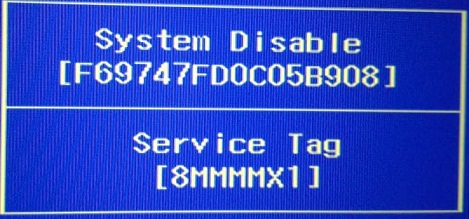
Unlock Bios password on Dell Laptop With: System Disable, Service Tag, all Passwords offered here will work 100% to reset Bios on Dell: Inspiron, Alienware, XPS, Vostro, Studio and Optiplex.
If you have a Dell Laptop or Desktop with System Disable + Service Tag Displayed on your laptop screen, You can buy your password here, Pay via debit or credit card using our link below.
Dear Customers, all Bios or Hard drive passwords will be sent by email within 5 minutes or the most it takes is 2 hours, Password will Work 100% or Your Money back!
Services are aimed to offer system disable Password for Dell: Inspiron 3043, Inspiron 3138, Inspiron 3147, Inspiron 3148, Inspiron 3521, Inspiron 3531, Inspiron 3537, Inspiron 3721, Inspiron 3737, nspiron 15 5565,, Inspiron 15R 5520, Inspiron 15R 5521, Inspiron 15R 5537, Inspiron 15R SE 7520, Inspiron 17R 5737, Inspiron 17R 5721, Inspiron M531R 5535, Inspiron M731R 5735, Inspiron 5542, Inspiron 5545, Inspiron 5547, Inspiron 5548, Inspiron 5551, Inspiron 5447, Inspiron 7348, Inspiron 7347, Inspiron 7352, Inspiron 7558, XPS 12 9Q23, XPS 15 L521X, XPS 14Z L412Z, XPS 14 L421X, Alienware M11x R2, Alienware 14, Alienware M11x, Alienware M14x, Alienware M14x R2, Alienware M14x, Alienware M18x R2, Alienware 18, Alienware M17x R3, Alienware M17x R4, Alienware 17, Dell Vostro 560, Vostro 3531, Vostro 7347, Vostro 15 3537, Vostro 15 3531, Vostro 3721, vostro 2521 7007, Vostro 15 3521, Latitude 3540, Studio, XPS 1647, Optiplex GX1,
Not all models are listed here.
If your Dell has service tag ending in number 3 or 2 you might need a new password from new algorithm, so, buy you password using this link:
Dell System Disable Password [ New ] algorithm
Links of Dell System Disable Password by Laptop models:
Disclaimer:
Please Note: We like to think that you are unlocking your own laptop and that you know how many passwords are set,
Know that Bios Password is used to unlock the motherboard, and hard drive password unlock only hard drives,
Bios & HDD Passwords Are Sold Separately and windows password removal program is also available.
How to Reset Dell System Disable password?
You can Reset the Dell System disable Bios password within bios setup.
Restart your Dell pressing F2 Every second,
Type the provided Dell Unlock code we sent you,
Go to: security
Then: passwords
Look for the option: Unlock Setup
Go to: administrator password
Them Reset the password
There will be 3 fields
Type the System Disable password we sent you in the first field
And leave the other 2 fields Blank !
Click on Save it.
Password should now be removed and your Dell laptop will stop asking for the current password on boot.
Keywords: dell system disable password, Dell Inspiron system disable, dell alienware system disable, dell vostro system disable
Customers who bought Dell System Disable Bios Password, Also bought:
Dell System Disable HDD Password,
If you need it, click here
Top Related Websites offering Dell Unlock Key Hint Number generators:
© www.pwd4bios.com